Custom Browser Profiles & Icons In Linux
The Problem I Am Solving
I use my computer for a lot of different things. Personal work, things directly related to my employer, and items related to my consulting clients. I like to keep these things distinct so that it is easier to keep track. As such, I make use of browser profiles. That's probably something many people are familiar with. You create a separate profile and when you launch your browser you can choose the profile you want to use. Where my setup goes a little further is in the customization of the icons for the windows in my desktop environment. When you use different profiles, the applications still show the same icon for the browser and switching between them sometimes requires looking at all of them to find the right profile.
My initial solution was to use color themes. While this helps some, it still requires switching to each window to look at the colors.
The Solution I Use
In GTK-based desktop environments (I use XFCE, but it should work in GNOME and others) you can use the xapps package to allow you to set a custom icon for your applications when you launch them. This is don by installing xapps and using a particular environment variable in the context of the application. For example, here's a snippet of my LibreWolf
#!/usr/bin/bash

XAPP_FORCE_GTKWINDOW_ICON="${HOME}/Pictures/zanclus_cornutus.svg" /usr/bin/librewolf -P default $@
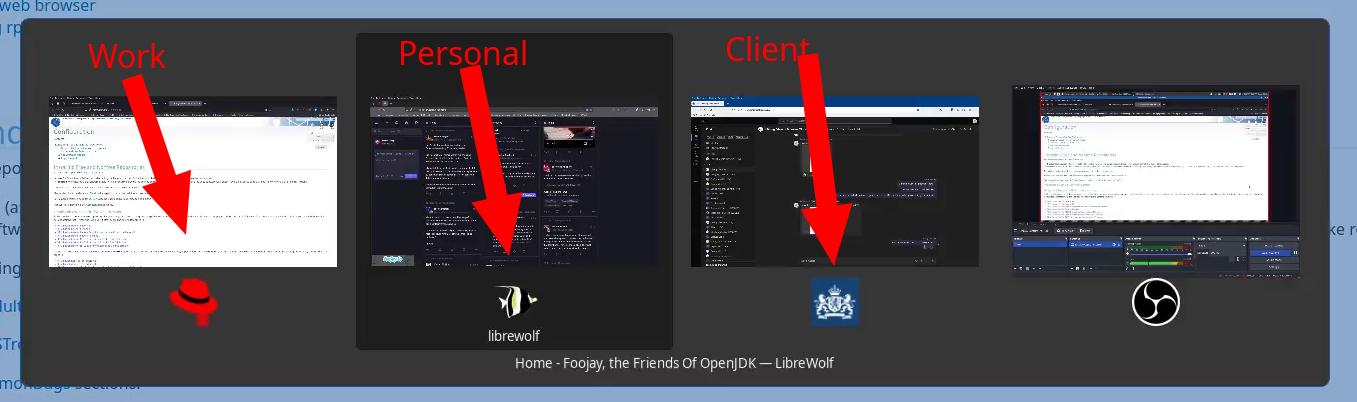
This little script is loaded in my path and launches the default profile for the browser with any other parameters ($@), but it sets the application's window icon to be a Zanclus Cornutus (a.k.a. Moorish Idol) (My favorite reef fish).
In the task bar or when switching applications using ALT+TAB, you see the custom icon. See the screenshots below to get a better idea of the concept.