
Overview
In my last post we were able to collect metrics and set up alerts using Prometheus and AlertManager. We also started building dashboards to visualize those metrics with Perses. Perses can visualize more than just metrics data though. In this post, I show how you can use VictoriaLogs in combination with Perses to track the logs from your hosted services.
Why VictoriaLogs?
When I first started trying to figure out how to visualize and search my logs I immediately started looking at the "usual candidates" from the industry: EFK Stack, ELK Stack, or Loki. I suppose these are all fine options, but they come with a lot of overhead for my self-hosted environment. While I was searching for alternatives, I stumbled across VictoriaLogs (and VictoriaMetrics/VictoriaTracing... but more on those in another post). They use standard filesystem storage and have lower overall resource requirements and, as far as I can tell, all of the same capabilities.
Deploying VictoriaLogs
As with most other things I have built, I will be deploying VictoriaLogs using a podman Quadlet. The quadlet file I am using is shown below:
[Unit]
Wants=traefik.service
Requires=backend-network.service
After=network-online.target
Requires=network-online.target

[Container]
ContainerName=logs
Image=docker.io/victoriametrics/victoria-logs:latest
PodmanArgs=--memory=1G --cpus=2
SecurityLabelType=container_runtime_t
Exec=-storageDataPath=victoria-logs-data -loggerFormat=json -httpAuth.username=''
IP=172.16.12.200
Volume=/opt/victoria/data:/victoria-logs-data:z
Network=backend
Label="traefik.enable=false"

[Service]
Restart=always

[Install]
WantedBy=default.target
You will noticed that I have set the username to an empty string. This disables authentication for VictoriaLogs. Since my log system is unprotected, I want to make sure it is not accessible to the outside world, and thats why I set traefik.enable=false.
We can now start the logging service.
systemctl daemon-reload
systemctl start victorialogs
Configure Traefik Access Logging
I would like to be able to search and analyze my Traefik access logs, so I will need to reconfigure traefik to keep certain fields and logs them. In my "static config" for Traefik I added the following:
accessLog:
  format: json
  filePath: /var/log/traefik/access.log
  bufferingSize: 100
  fields:
    defaultMode: keep
    headers:
      defaultMode: keep
      names:
        X-Real-IP: keep
        X-Forwarded-For: keep
        X-Forwarded-Host: keep
        X-Forwarded-Proto: keep
These settings will have Traefik writing it's access logs in JSON format and include headers in the data.
Streaming Traefik Access Logs To VictoriaLogs Using Fluent-Bit
Here again, I looked at some of the more common solutions like fluentd and logstash, but I found that what I wanted was not as simple with those tools. Also, fluent-bit is included in the CentOS repositories, so I decided to give it a try.
Configuring The Fluent Bit Basics
I didn't give it much thought when I set out on this journey (2 days ago), but I just assumed that JSON formatted logs would be sufficient. I was sorta right and mostly wrong. You CAN just upload JSON logs via fluent-bit to VictoriaLogs, but you CANNOT really visualize them in Perses without a little data massaging. The basics of fluent-bit are straightforward though:
- Install fluent-bit
- On Fedora/CentOS/RHEL:
dnf install -y fluent-bit
- On Fedora/CentOS/RHEL:
- Edit
/etc/fluent-bit/fluent-bit.conf[SERVICE] flush 1 daemon Off log_level info parsers_file parsers.conf plugins_file plugins.conf http_server Off http_listen 0.0.0.0 http_port 2020 storage.metrics on [INPUT] Name tail Tag traefik.access Path /opt/traefik/logs/access.log Parser traefik [OUTPUT] Name http Match * host 172.16.12.200 # IP of your victorialogs container port 9428 uri /insert/jsonline?_stream_fields=stream&_msg_field=log&_time_field=date format json_lines json_date_format iso8601 - Edit
/etc/fluent-bit/parsers.confand add the following parser[PARSER] Name traefik Format json Time_Key time Time_Format %Y-%m-%dT%H:%M:%S%z Time_Keep on
That will get the data into VictoriaLogs, but not really in a useful format. Perses and VictoriaLogs expect there to be a field named _msg, so we need to do something more to make that possible.
Configuring Fluent Bit A Bit More
Fortunately for us, fluent-bit supports custom filters and parsers which can be written in Lua. Lua is a VERY simple language to learn, but you don't need to learn the whole thing to make a fluent-bit filter.
- Modify the
/etc/fluent-bit/fluent-bit.confto add this filter:[FILTER] Name lua Match traefik.access script traefik_access.lua call aggregate_msg - Create the
/etc/fluent-bit/traefik_access.luascriptlua-- The tag is what was attached in the INPUT -- The timestamp is the UTC timestamp -- The record is a Lua "table" containing the JSON data function aggregate_msg(tag, timestamp, record) -- Copy the original record to a new variable new_record = record -- If the RequestPort is set, include it in the URL if record["RequestPort"] == "-" then new_record["_msg"] = string.format( "%s %s %s://%s%s", record["DownstreamStatus"], record["RequestMethod"], record["RequestScheme"], record["RequestHost"], record["RequestPath"] ) else new_record["_msg"] = string.format( "%s %s %s://%s:%s%s", record["DownstreamStatus"], record["RequestMethod"], record["RequestScheme"], record["RequestHost"], record["RequestPort"], record["RequestPath"] ) end new_record["_tag"] = tag -- The first element of the return tuple: -- -1 means this log item should be dropped -- 0 means this log item should be passed unmodified -- 1 means the record was modified and should be updated return 1, timestamp, new_record end - Restart fluent-bit:
systemctl restart fluent-bit
Now you have a _msg field in your Traefik access logs which shows the HTTP response code, HTTP Method, and the full URL
Creating A Perses Log Viewer
We're use the same Perses instance we used in my previous post. It can handle log data from VictoriaLogs just as well as Prometheus data.
Create A New Project, Dashboard, and Panel For Traefik Logs
From the Web Console
- Log on to your Perses web console
- Click on "Create Project" and give it the name "Traefik"
- Click on "Datasources"
- Click "Add Datasource" and set the following fields:
- Name: victorialogs
- Display Label: VictoriaLogs
- Plugin Options -> Source: VictoriaLogs Datasource
- HTTP Settings: Proxy
- HTTP Settings -> URL: http://172.16.12.200:9428 (This should be the IP set on your Quadlet for your backend network)
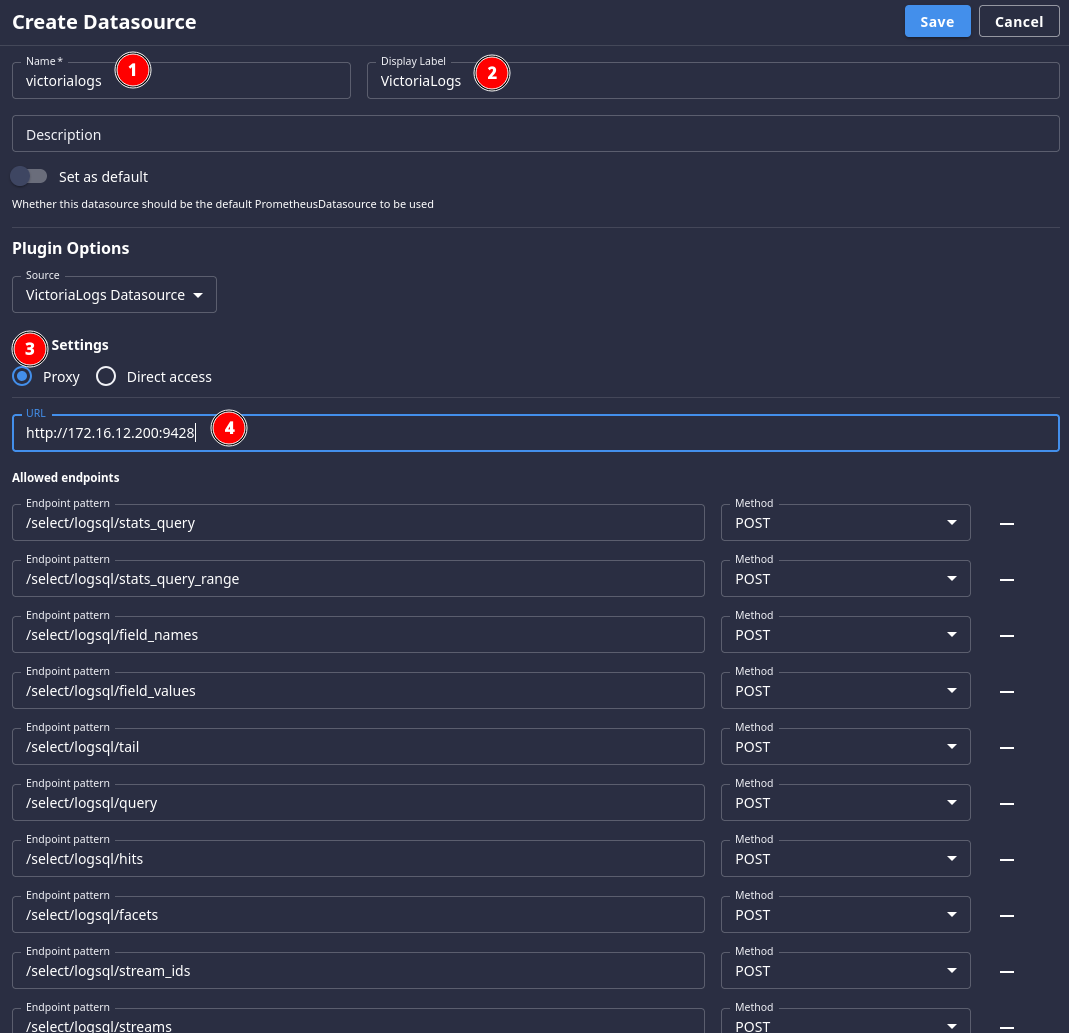
- Click
- Click on "Add Dashboard" and name it "Traefik"
- Click on "Add Panel" and set the following settings:
- Name: Traefik Access Logs
- Type: Logs Table
- Query Type: VictoriaLogs Log Query
- Datasource: victorialogs
- LogsQL Query:
_tag:traefik.access
- Click "Run Query" to see something like this:
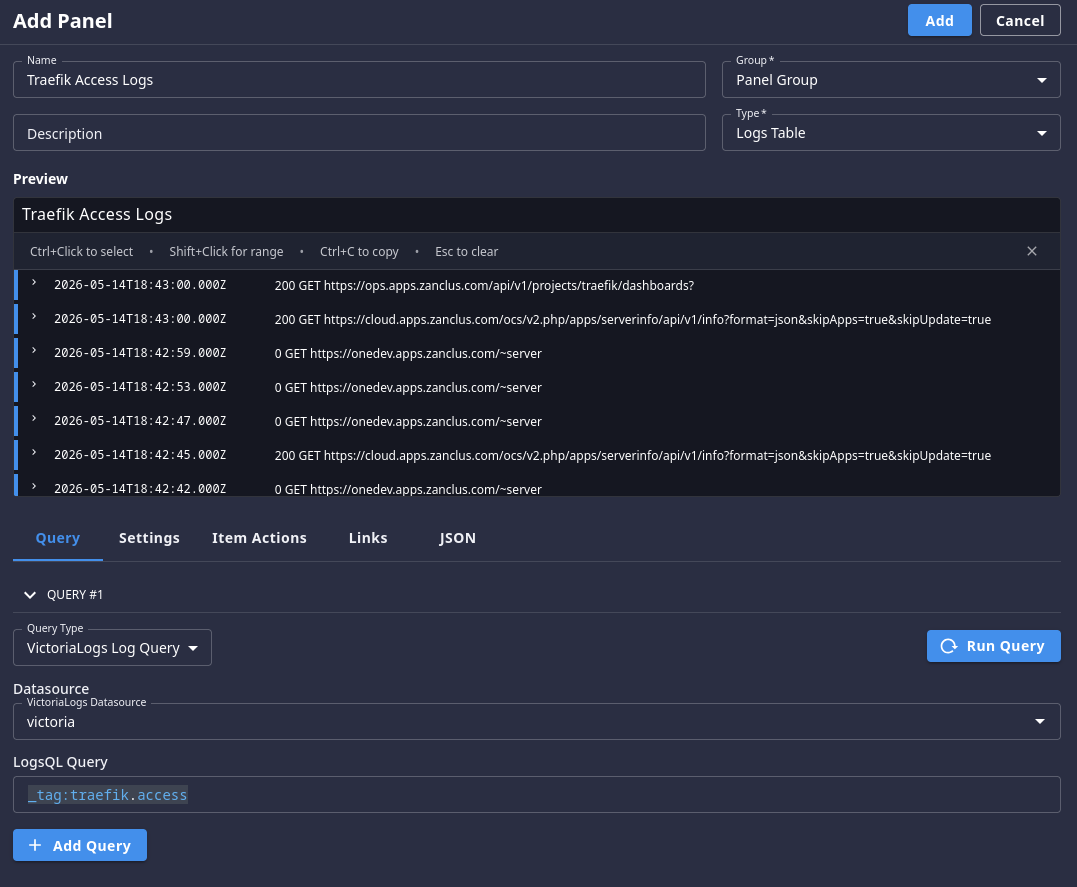
- Click "Add" to save your panel, then save your dashboard as well
Next Steps
You can also forward any other logs you might like to be able to track into VictoriaLogs as well. It's relatively simple to have systemd push logs into the system. You might also want to learn more about LogsQL and build more complex log views for different scenarios.
I hope you found this useful, and whether you did or not you can let me know using the Mastodon link at the top of this page.